Got a project in mind?
We’d love to hear about it.

Get in touch
Yellow Peach web design agency

We compare WordPress and Wix on cost, flexibility, AI tools and SEO to help you decide which platform is right for your business in 2026.

Wix and WordPress solve the same basic problem, getting a business online, from almost opposite directions. Wix is a fully hosted, all-in-one builder that’s leaned hard into AI-assisted design in recent years. WordPress is an open-source CMS that gives you complete control, provided you (or someone you work with) are willing to take on a bit more responsibility for running it.

Wix has genuinely closed the gap with WordPress on features over the past few years, its app market, AI site generator, and Studio editor have all matured considerably. That makes this a closer call than it might have been five years ago, but it doesn’t change the fundamental trade-off: convenience and speed versus ownership and long-term flexibility.

We’re a WordPress agency, so we won’t pretend to be neutral. But we think it’s worth being straight about where Wix genuinely earns its popularity, and where the trade-offs start to bite once a business grows.
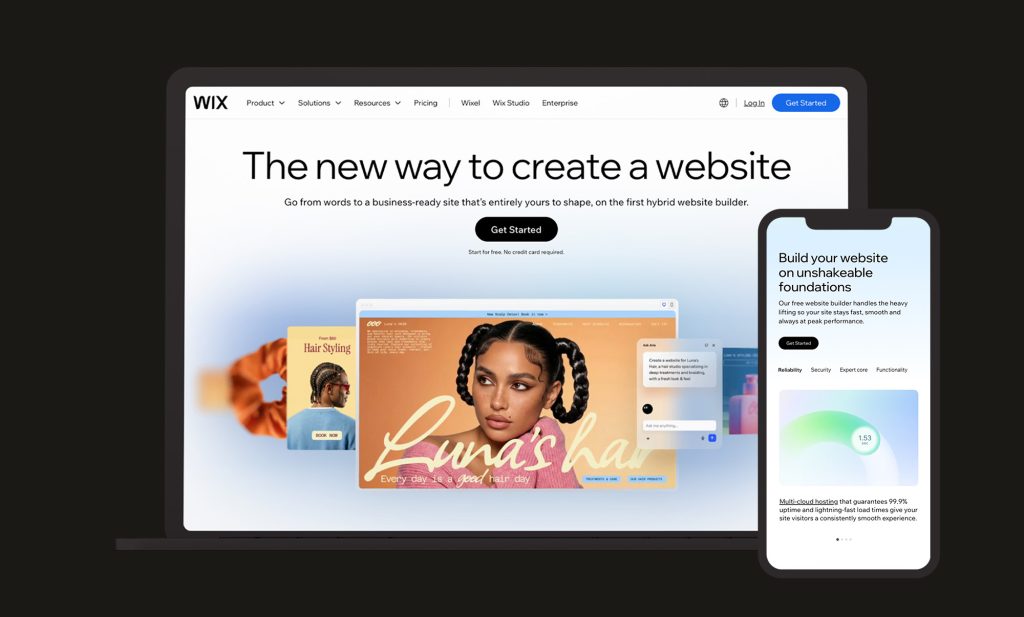
Wix Device Mockups

WordPress vs Wix Market Share 2026

WordPress continues to lead by a wide margin, powering roughly 42.5-43.5% of all websites globally in 2026, and around 60% of the market among sites running an identifiable CMS.

Wix sits well behind at approximately 4.2-4.3% of all websites, though it remains the most widely used dedicated website builder in the world, having grown from close to nothing in 2014. Wix has continued adding share steadily through 2025 and into 2026, driven heavily by its AI-assisted site generation tools and a genuine free tier, both of which lower the barrier to entry for first-time site owners.

Analysis of where WordPress’s market share has shifted in 2026 found that Squarespace and Wix combined accounted for only around 6% of WordPress’s losses, with most movement instead going to modern site builders like Framer and Webflow, or to sites with no detectable CMS at all. Wix isn’t so much stealing existing WordPress users as capturing a different audience from the outset, typically first-time site owners who were never going to build on WordPress in the first place.

WordPress vs Wix: Setup and Ease of Use

How Easy is Wix to Set Up?

Wix’s biggest advantage is genuinely how little you need to know to get started. Its AI site generator can produce a working, populated website from a short description of your business in minutes, and the drag-and-drop editor allows free-form placement of elements rather than confining you to a rigid grid, giving Wix a level of pixel-level design freedom that’s genuinely different from a template-based builder like Squarespace.

There’s also a real free plan, not just a trial, which lets you build and test before paying anything. For a sole trader who wants something live today with no prior web experience, Wix remains one of the fastest routes to a working site.

How Easy is WordPress to Set Up?

WordPress requires more upfront setup: choosing hosting, installing WordPress, and selecting a theme are all manual steps rather than a single guided flow. That’s a genuinely higher barrier for someone building entirely solo with no technical background.

What you gain is a site that isn’t built inside a proprietary editor. Every part of a WordPress site, from the underlying code to the content itself, is portable and under your control. For businesses working with a developer or agency from the outset, which is the norm for anything beyond a very simple site, this setup gap matters far less in practice, since the technical groundwork is handled for you either way.

Want a straight answer on whether your project genuinely needs WordPress’s flexibility or would be well served by something simpler? Get in touch and we’ll give you an honest steer.

Wix-Pricing

WordPress vs Wix: Cost and Feature Comparison

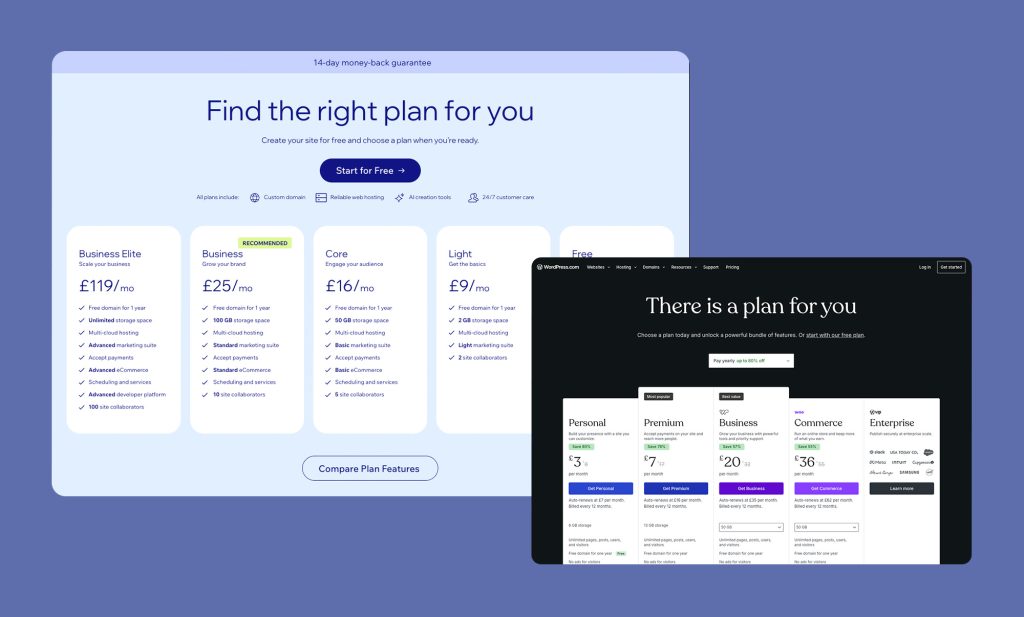
Wix’s pricing is straightforward and, notably, drops its platform transaction fee entirely when you use Wix Payments, a genuine point in its favour. WordPress’s costs are more variable, but tend to scale better for growing or content-heavy sites.

WordPress Wix Light Wix Core Wix Business
Monthly Platform Fee Free £9/mo £16/mo £25/mo
Transaction Fee (using Wix Payments) None N/A (No ecommerce functionality) 2.1% + 20p processing 2.1% + 20p processing
Hosting £20-£100/mo Included Included Included
Typical App / Plugin Spend £0-£50/mo Limited third-party apps £20-£40/mo £20-£40/mo
Custom CSS / Code Full Limited (Velo by Wix on higher plans) Limited Limited
Site Portability Full Very limited – no design export Very limited Very limited
Platform Lock-In None High High High


Wix UK pricing correct as of mid-2026, billed annually. WordPress hosting costs vary by provider and site requirements.

How Much Does Wix Cost? (UK)

Wix’s Classic plans run from £9/month for Light (no store) up to £119/month for Business Elite, with Core (£16/month) the entry point for a functional online store. For online sales, Wix charges an average of 2.1% of the transaction amount + 0.20 GBP through Wix Payments for credit / debit card transactions.

How Much Does WordPress Cost? (UK)

WordPress’s cost structure is the same as with any comparison, free software, paid hosting (typically £20-£100/month for solid managed hosting), and optional premium themes or plugins depending on what the site needs to do. There’s no platform-level transaction fee on any WordPress site, regardless of scale.

The real difference shows up at growth. Wix’s app market, while extensive, charges recurring fees per app, and costs can add up quickly for a store running several add-ons simultaneously.

A comparable WordPress site, built with the right plugin stack from the outset, often ends up with a lower and more predictable long-term cost, particularly once you’re past the very early, low-traffic stage.

Talk to our WordPress development team if you’d like a realistic cost comparison for your specific project before committing either way.

Flexibility and Customisation

How Flexible is Wix?

Wix has made real strides on flexibility, particularly through Wix Studio and Velo (its custom code layer), which allow more advanced users to build genuinely bespoke functionality within the platform. Its app market, with several hundred third-party integrations, gives Wix sites a reasonable amount of room to add functionality without custom development, provided what you need already exists as an app.

The structural limitation remains portability. Wix does not offer a native export of your site’s design, only blog posts and product data can be exported, in CSV format, while layouts, galleries, and custom pages stay locked to the platform permanently.

If you ever decide to leave Wix, you’re rebuilding from scratch rather than migrating. That’s a meaningfully different risk profile to WordPress, where leaving a host is disruptive but leaving the platform itself is never necessary.

How Flexible is WordPress?

WordPress’s flexibility comes from being fully open source. There’s no ceiling on what you can build, no proprietary editor constraining your design, and no dependency on a single company’s roadmap for the features you need. With over 59,000 free plugins and an enormous global developer community, WordPress can be extended to do almost anything, from custom booking systems to bespoke membership platforms.

Site portability matters here too. A WordPress site’s database, media, and content can be exported and moved to different hosting at any point. That’s a genuine safeguard against being trapped by a single provider’s pricing or policy decisions down the line.

Wix Sideways Phones

WordPress vs Wix: SEO Comparison

WordPress’s SEO advantage comes from the depth of control available through plugins like Yoast SEO or Rank Math: granular schema markup, custom redirects, full sitemap control, and complete freedom over URL and content structure.

Wix’s SEO tooling has improved substantially in recent years and is genuinely competitive at a basic level, editable meta tags, alt text, clean URLs, and built-in SEO guidance through its Wix SEO tools panel. Where it still falls short of WordPress is depth: advanced schema types, granular crawl control, and the kind of large-scale content architecture (topic clusters, pillar pages, extensive blog taxonomies) that content-driven WordPress sites are built around.

On raw technical performance, Wix has a genuine edge worth acknowledging. Wix’s Core Web Vitals pass rate sits around 71-75%, ahead of the WordPress average, since Wix controls the entire hosting and rendering stack and optimises it centrally. A well-built, well-hosted WordPress site can match or exceed that, but it takes deliberate work to get there rather than coming as standard.

For businesses planning to invest seriously in organic search over the medium to long term, particularly through content marketing, WordPress’s ceiling on SEO control remains meaningfully higher than Wix’s.

WordPress vs Wix: Security & Maintenance

Wix manages security entirely on your behalf. Hosting, SSL, platform updates, and infrastructure security are all handled centrally, with nothing for the site owner to patch or maintain. That’s a genuine advantage for anyone without the time or inclination to think about site maintenance.

WordPress puts security in the hands of whoever manages the site. Core, theme, and plugin updates all need to be kept current, and a proper backup and monitoring routine (tools like Wordfence are standard here) is essential rather than optional. Managed correctly, this isn’t a heavy burden, and WordPress security tooling has matured significantly, but it is an active responsibility rather than something handled invisibly in the background.

The trade-off is the same one that runs through most of this comparison: Wix trades control for convenience, WordPress trades convenience for control.

WordPress vs Wix: AI Tools and the App Market

This is where Wix has made its most significant investment in recent years, and it’s a genuine differentiator worth covering on its own. Wix’s AI site generator can build a full working website, structure, copy, and imagery, from a short text prompt, and its ongoing AI features extend into content editing, image generation, and basic SEO suggestions built directly into the dashboard.

Combined with an app market running into the several hundreds, covering everything from bookings and loyalty programmes to advanced marketing automation, Wix has built a genuinely capable all-in-one ecosystem for businesses that want functionality without custom development.

WordPress’s equivalent isn’t a single unified AI layer, it’s a rapidly growing set of AI-powered plugins (for content, image generation, and SEO) layered onto an existing, much larger plugin ecosystem. The functional ceiling is higher on WordPress since there’s effectively no limit to what a developer can build or integrate, but it doesn’t arrive as a single polished, native experience the way Wix’s does.

For a business that wants AI-assisted building entirely self-serve, with nothing to configure, Wix currently has the smoother experience. For a business that wants AI capability built into a fully custom, owned platform, WordPress still offers the greater long-term ceiling.

Which Is Better: WordPress vs Wix

There is no universal answer, but there is usually a clearer answer for any specific business.

Here’s how we’d frame it:

WordPress Wix
Content-Led / SEO-First
WordPress is a Better Fit
Design and Feature Customisation
WordPress is a Better Fit
Data Ownership & Site Portability
WordPress is a Better Fit
Cost Control at Scale
WordPress is a Better Fit
Complex or Bespoke Functionality
WordPress is a Better Fit
Fastest Time to Launch
Wix is a Better Fit
AI-Assisted Site Building
Wix is a Better Fit
Zero-Maintenance Hosting
Wix is a Better Fit
Ease of Use
Wix is a Better Fit
Simple Store or Brochure Site
Wix is a Better Fit


As with Squarespace, the deciding factor usually isn’t which platform is “better” in the abstract, it’s whether you’re building something that needs to stay flexible and scale on your terms, or something that just needs to exist, look professional, and be simple to run.

Building or Migrating Your Site to WordPress?

Whether you’re starting fresh, have outgrown Wix’s app market and lock-in, or want a website built to scale properly with your business, we can help you build something on WordPress that’s designed for long-term growth and full ownership.

Ready to push your platform?

Ready to push your platform?

Ready to push your platform?

Ready to push your platform?

Ready to push your platform?

Ready to push your platform?

Ready to push your platform?

Ready to push your platform?

Ready to push your platform?

Ready to push your platform?

Ready to push your platform?

Ready to push your platform?

Ready to push your platform?

Ready to push your platform?

Ready to push your platform?

Ready to push your platform?

Ready to push your platform?

Ready to push your platform?

Ready to push your platform?

Ready to push your platform?

Ready to push your platform?

Ready to push your platform?

Ready to push your platform?

Ready to push your platform?

Ready to push your platform?

Ready to push your platform?

Ready to push your platform?

Ready to push your platform?

Ready to push your platform?

Ready to push your platform?

Ready to push your platform?

Ready to push your platform?