Got a project in mind?
We’d love to hear about it.

Get in touch
Yellow Peach

A design system keeps your website consistent, easier to manage, and cheaper to grow. Here's what it means for your business, in plain terms.

A design system is the difference between a website that gets easier to run over time, and one that gets more fragile with every new page you add. It’s a set of ready-made building blocks, buttons, headings, forms, layouts, built once, tested properly, and reused everywhere they’re needed, rather than redesigned from scratch each time.

Think about how a well-made piece of flat-pack furniture goes together. It’s built from a small set of parts, the same screws, the same brackets, the same panel edges, used again and again in different combinations to make a wardrobe, a bookshelf, or a sideboard. Nobody designs a new type of screw for every product. The parts already exist, they’re already tested, and the only real decision left is how to arrange them for the job in hand.

A website can work the same way, and when it does, it’s described as being built on a design system. The Nielsen Norman Group, a well-respected name in user experience research, describes it as a complete set of standards for managing design at scale using reusable components and patterns. The everyday version of that idea is simple enough: once a button, a heading style, or a layout has been designed properly, it gets used everywhere it’s needed rather than reinvented every time someone builds a new page.
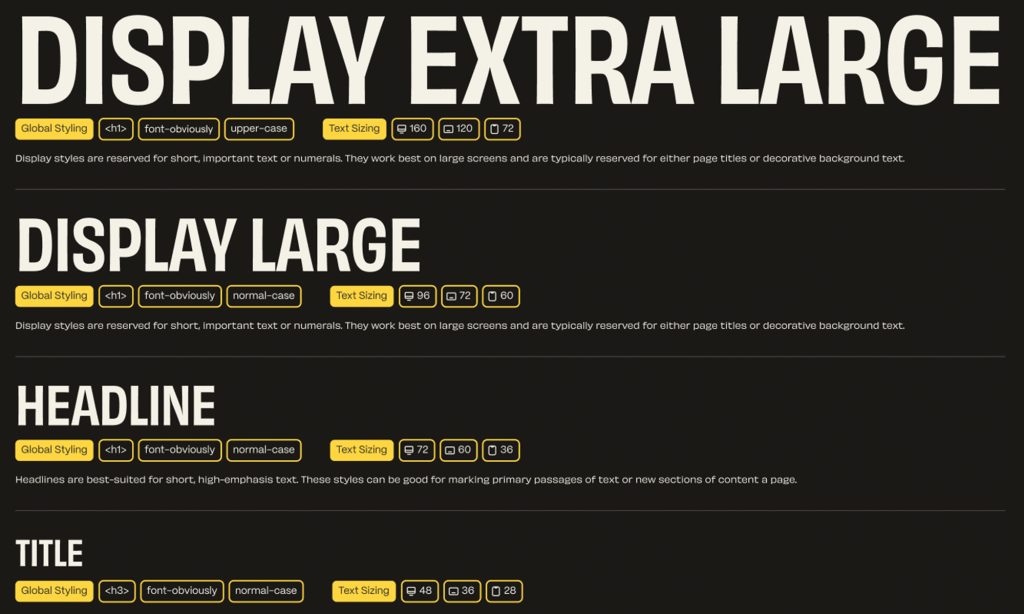
Example of Text Styles in a Design System

Design Systems vs Website Templates

A design system is not a generic template pulled off a shelf and dropped onto every client’s site. It’s built from scratch around your brand, your colours, your tone, and the specific things your business needs a website to do, and it’s every bit as bespoke as any other website we design. The difference is what happens once that groundwork is done. Rather than designing a new button or a new page layout from scratch every time you need one, you’re drawing from a library of your own components that were designed properly the first time, so your site stays consistent as it grows instead of drifting further from itself with every new page.

Most businesses only start thinking about any of this once they feel its absence. A new landing page doesn’t quite match the rest of the site. Someone wants a campaign page live by Friday, but every previous page was built as a one-off, so nothing can simply be reused and a developer has to start again from scratch. A well-meaning employee edits a paragraph in the content management system and accidentally breaks the layout on mobile. None of these problems are really about that one page. They’re symptoms of a website that was built without a system behind it, and it’s exactly this pattern that a design system is meant to head off, by keeping a site’s building blocks consistent, reusable, and safe for non-technical people to work with day to day.

With that groundwork laid, the more useful question for a business owner isn’t “what is a design system” but “what is my website actually costing me by not having one, and what changes if it does.” That’s where the real business case sits.

The Cost of Not Having a Design System

Every website that grows organically, page by page, campaign by campaign, tends to pick up what’s often called design debt. Each new page is a slight variation on the last, built under time pressure, without much reference to what came before. Give it a year or two, and a site that started out with five clean, consistent templates can end up with dozens of near-duplicate layouts, each behaving slightly differently, each needing a developer to touch it individually whenever something has to change sitewide, a new brand colour, say, or an updated logo.

This isn’t just a nice idea with no evidence behind it. McKinsey’s well-known study on the business value of design, which tracked 300 publicly listed companies across three industries over a five-year period, found that the companies with the strongest design practices grew revenue 32 percentage points faster, and delivered 56 percentage points more return to shareholders, than their industry peers over that same period. The study wasn’t really measuring how nice things looked. It was measuring the habit of treating design with the same discipline as revenue and cost, which is exactly what a design system builds in. Consistency and reuse aren’t just tidier. They’re tied to genuinely better business outcomes, because decisions get made once, made properly, and then applied everywhere, rather than rushed every time under pressure.

There’s a similar issue with accessibility, and it tends to catch people out because it’s easy to assume your site is fine until someone checks. The most recent WebAIM Million report, an annual check-up on the top one million website home pages run by the non-profit accessibility organisation WebAIM, found that 95.9% of home pages had detectable accessibility failures, averaging 56.1 errors per page. Sites built page by page, without shared components, tend to repeat the same mistakes on every new page because each one is built from scratch. A design system won’t fix this on its own, but it does mean things like colour contrast, form labelling, and keyboard navigation get sorted properly once, in a handful of components, rather than left to chance on page ninety-four.

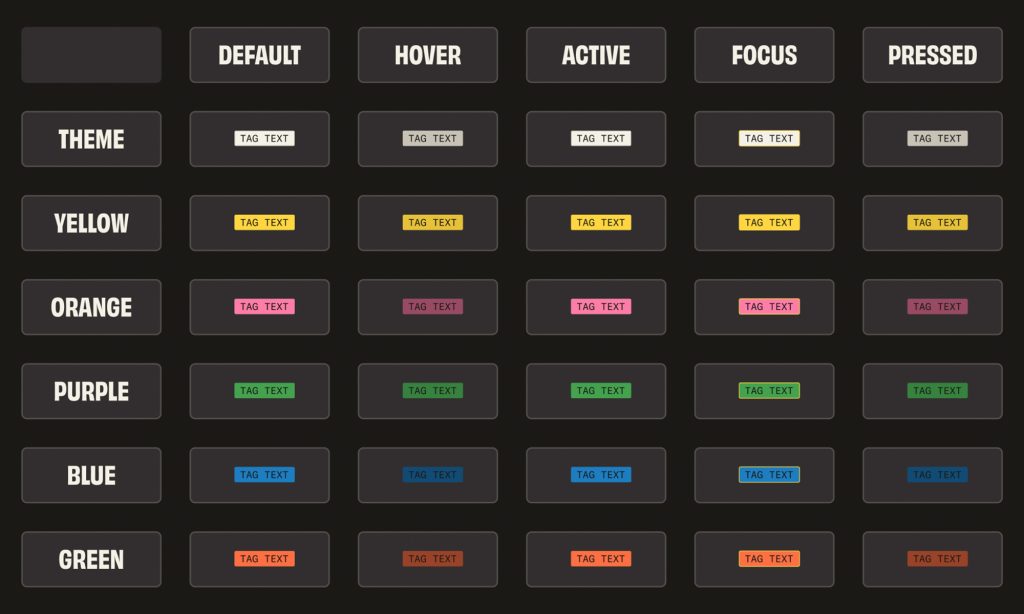
Example of Chip Styles in a Design System

What Actually Changes When You Build on a System

The practical difference tends to show up in three places that matter to a business owner: how fast things get done, what they cost, and who’s allowed to touch the website without breaking it.

The Speed Benefits

The Nielsen Norman Group points out that the main benefit of a mature design system is that design and development work can be created and repeated quickly, because teams reuse the same tested elements rather than reinventing them for every new page. New pages, campaigns, and product launches stop feeling like development projects and start feeling more like assembly, using parts that already exist and already work. That doesn’t mean every page ends up looking identical. It means the underlying vocabulary, the building blocks, stay the same, while the arrangement and the content can still flex to suit whatever you’re building.

The Cost Benefits

On cost, the payoff builds up over time rather than showing up on day one. There’s an upfront investment in getting the system right, working out what a heading should look like, how a call-to-action button behaves, how a form should validate what someone types into it, and writing all of that down clearly. That work isn’t free. But every page built afterwards draws on it rather than repeating it, so each new page or feature tends to get cheaper the longer the system’s been in use. It’s the opposite of how most ageing websites behave, where every new page tends to cost a bit more than the last as the surrounding inconsistency piles up.

The Control Benefits

This is the bit business owners tend to notice first. A website built from well-documented, modular components can be handed to a marketing manager with genuine confidence that they can build a new page, update some copy, or rearrange a layout without needing a developer on standby, and without the risk of quietly breaking something elsewhere on the site. This is the thinking behind WordPress web design built around Gutenberg, WordPress’s native block editor.

Every piece of content, from a paragraph to an image gallery, is its own reusable block, and WordPress’s own documentation confirms that full site editing, which extends this block-based approach to headers, footers, and navigation as well as ordinary page content, became a stable feature with WordPress 5.9 back in early 2022. That matters because WordPress isn’t some niche choice. According to W3Techs, which tracks website technology across the web, WordPress runs 40.2% of all websites and 58.7% of those built on a known content management system, making it the platform of choice for businesses that want to own their site rather than lean on a developer for every small change.

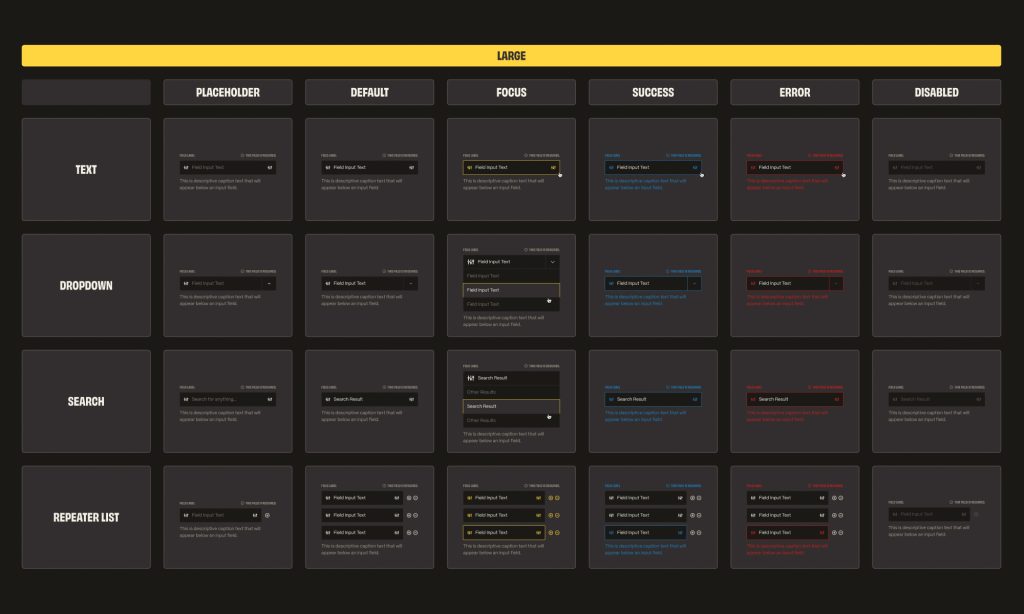
Example of Input Fields in a Design System

How This Shapes the Way We Build

It’s precisely because the benefits above apply so broadly, not just to large, fast-growing sites, but to any business that will one day want a new page, a new campaign, or a new person editing content, that we design and build every site around a proper design system as standard. The groundwork it takes to do this properly is exactly why it pays off later, whether that’s next month or in three years’ time.

The choice of platform genuinely matters here. WordPress, built out with a proper set of custom Gutenberg blocks, is a great foundation for a design system, because the platform is built around exactly this kind of modular editing, and a well-planned WordPress development project can build a design system straight into the block library your team uses every day. If you’re coming from an older site with years of built-up inconsistency, a WordPress migration is usually the natural moment to bring a design system in, since the content has to be rebuilt anyway. And for projects that outgrow what a content management system can reasonably handle, complex logged-in dashboards, bespoke booking systems, or anything that needs to talk to other business software, a custom web application built in Laravel can apply the same thinking in code, keeping the same components and standards consistent even outside WordPress.

Whichever route suits you, a design system isn’t something we hand over once and walk away from. It needs a bit of ongoing care, new components added as your business needs them, old ones retired when they’ve had their day, which is one of the reasons ongoing WordPress maintenance and support tends to matter more, not less, once a proper system is in place.

Comparing the Approaches

Here’s a simple side-by-side of the trade-offs a business owner is actually weighing when deciding how to approach a website build or rebuild.
 

Decision factor Bespoke, page-by-page design Reused templates, no formal system Proper design system (modular blocks)
Upfront cost Lower per page initially Moderate Higher initial investment
Non-technical editing High risk of breaking layouts Workable but limited Safe, designed for it
Consistency across pages Poor, degrades over time Moderate Strong by default
Scalability for new pages Slow, each is bespoke Faster, but rigid Fast and flexible
Accessibility risk High, repeated per page Moderate Lower, fixed once, applied everywhere
Dependency on developers Constant Frequent Occasional, for new components only


None of these rows tells the whole story on its own, but taken together they show why the investment on the right tends to pay for itself within the first year or two for almost any business, largely because so much of the real cost of a website isn’t the initial build, it’s everything that happens to it afterwards.

The Practical Takeaway

At heart, a design system is about where control sits. Without one, control sits with whoever built the last page, and every future change depends on remembering, or working out again, how that page was put together. With one, control sits with a documented, tested set of standards that any competent editor, marketer, or developer can pick up and use correctly, whether that’s next week or in three years’ time. For a growing business, that’s not really a design preference, it’s closer to good housekeeping, and the data on both design maturity and web accessibility suggests it’s one that a surprising number of otherwise well-run websites still go without.

Looking to get started with a design system?

Building this properly from day one is what we do at Yellow Peach, on every WordPress site we design and every custom Laravel application we build. If you’re planning a new website, or looking at a rebuild of one that’s grown a little unwieldy over the years, we’d be glad to talk you through what a design system built around your brand could look like. Get in touch with our web design team to start the conversation.

Ready to push your platform?

Ready to push your platform?

Ready to push your platform?

Ready to push your platform?

Ready to push your platform?

Ready to push your platform?

Ready to push your platform?

Ready to push your platform?

Ready to push your platform?

Ready to push your platform?

Ready to push your platform?

Ready to push your platform?

Ready to push your platform?

Ready to push your platform?

Ready to push your platform?

Ready to push your platform?

Ready to push your platform?

Ready to push your platform?

Ready to push your platform?

Ready to push your platform?

Ready to push your platform?

Ready to push your platform?

Ready to push your platform?

Ready to push your platform?

Ready to push your platform?

Ready to push your platform?

Ready to push your platform?

Ready to push your platform?

Ready to push your platform?

Ready to push your platform?

Ready to push your platform?

Ready to push your platform?