Got a project in mind?
We’d love to hear about it.

Get in touch
Yellow Peach web design agency

When choosing a CMS for a new website, it's easy to be influenced by how other websites built on that platform look.

When choosing a CMS for a new website, it’s easy to be influenced by how other websites built on that platform look. We regularly speak to businesses that associate newer platforms with more modern, visually impressive websites, while WordPress is sometimes seen as the older, less exciting option.

It’s an understandable perception, but it confuses two different parts of a website. The CMS you choose can have a significant impact on how your website is built, managed and developed over time, but it doesn’t determine whether the finished website looks good. In fact, we’d argue that some of the things you can’t see from the front end should play a much bigger part in choosing your platform.

Does your CMS determine how your website looks?

Not really. There are technical differences between platforms that affect how a website is developed, but there isn’t a particular visual style that comes with WordPress, Webflow, Framer, Craft, Sanity or most other established platforms.

The front end is the part your visitors see: the typography, layouts, navigation, animations, interactions and responsive behaviour. The CMS sits behind that and gives your team a way to manage the content being displayed. Depending on the technology being used, those two layers can be closely integrated or almost completely separate.

Either way, a capable design and development team has considerable control over the experience they create on the front end. WordPress can power a highly animated, visually ambitious website just as it can power a fairly basic corporate website. The fact that both use WordPress tells you very little about the quality of their design.

The same is true of other platforms. You’ll find excellent and fairly ordinary websites built with all of them, because the quality of the finished product is primarily determined by the people designing and building it.

Figma design concepts

Why do newer platforms often look more modern?

The perception hasn’t appeared from nowhere. A lot of newer website platforms have been built, positioned or marketed around a different audience to traditional content management systems.

Platforms such as Webflow and Framer have made it possible for designers to take much more control of the website-building process themselves. Instead of designing something in Figma and handing it over to a developer to reproduce, visual development tools allow much more of that work to continue through to the finished website.

Naturally, platforms aimed at designers put a lot of emphasis on visual control, interactions and animation. They’ve attracted communities of designers who produce some excellent work, and that work then becomes part of how the platforms themselves are perceived.

Other modern CMS platforms take different approaches. Sanity, for example, separates structured content from the front end, giving developers considerable freedom over how and where that content is presented. Craft is similarly flexible in how developers model content and build the presentation layer.

These are genuinely different approaches to building and managing websites, and there can be good reasons to choose any of them. What doesn’t follow is that their front ends are inherently capable of looking better than a website using WordPress or another CMS.

Making a particular type of front-end development easier or more accessible isn’t the same as making it exclusively possible on that platform.

What should you judge a CMS on?

This is where we think the CMS conversation should spend much more time.

Most of the focus during a website project naturally goes on the front end. It’s the part you can see, so it’s easy to compare designs, discuss layouts and get excited about how the finished website is going to look.

But once the website launches, someone in your business has to manage it. Your marketing team might need to publish articles, create landing pages, add case studies, introduce new services or change calls to action. Three years later, your website might need to do things nobody had considered when it was originally designed.

How easily you can do all of that is much harder to judge from a portfolio, but it should be a major part of how you choose a CMS.

Rather than asking which platform seems to produce the nicest websites, we’d start with questions such as: how easily can our team make everyday changes? Can we create new pages ourselves? Can the website accommodate new functionality as the business develops? Can it integrate with the systems we already use? What will require a developer, and what can our own team manage?

Those answers will tell you far more about whether a CMS is suitable for your business than its showcase will.

The editing experience matters

Your customers might spend a few minutes at a time using your website. Your marketing team could be working with it several times a week for the next five years, so the experience behind the website deserves proper consideration too.

That doesn’t necessarily mean giving editors complete freedom. In our experience, an editing system where someone can change absolutely everything can create just as many problems as one where they can’t change enough.

For many business websites, a component-based approach provides a useful middle ground. The design and development team creates a set of flexible sections based on the website’s design system, and editors use those components to create new pages.

A marketing team might combine an introduction, statistics, testimonials, related case studies and a call to action to create a new campaign page. They have the flexibility to build something themselves, but they don’t have to make decisions about typography, spacing, responsive behaviour or whether a particular layout works on mobile.

Those decisions have already been made as part of the design and development process. The CMS gives them control over the things they actually need to manage.

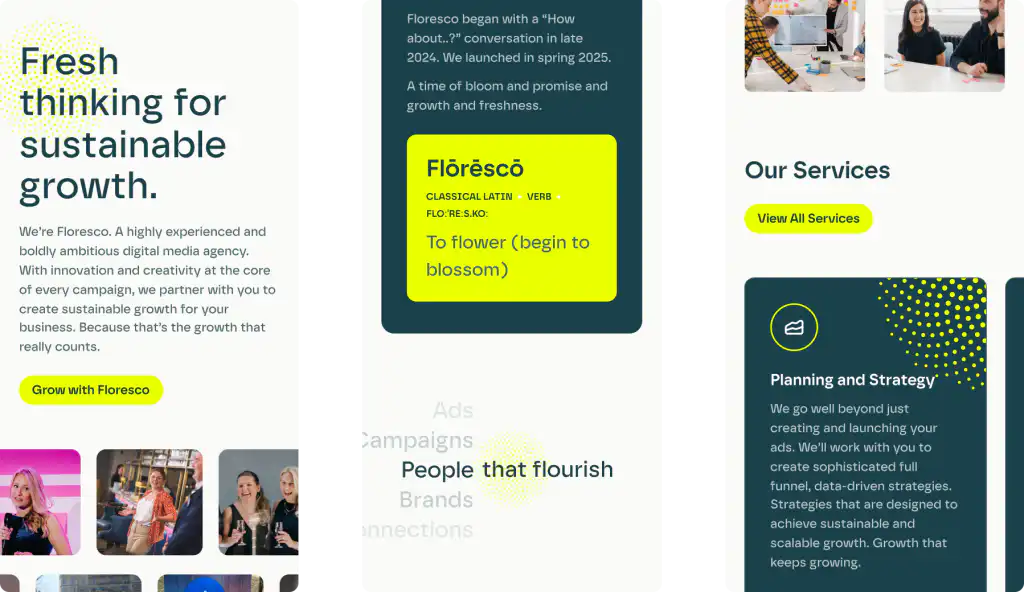
Floresco mobile website

The implementation matters too

There’s another reason to be careful about judging a CMS too broadly: two websites built on exactly the same platform can provide completely different experiences behind the scenes.

WordPress is probably the clearest example. One WordPress website might use an off-the-shelf theme, a page builder and a large collection of plugins. Another might have a completely bespoke front end with a carefully designed set of Gutenberg blocks built specifically around the client’s content and workflows.

Technically, both are WordPress websites. In practice, they can feel like completely different products to the person managing them.

The same principle applies elsewhere. Flexible platforms can be implemented well or badly, and the decisions made by the team building your website will have a significant impact on what you eventually end up using.

So asking whether a particular CMS is ‘easy to use’ only gets you so far. Ask your agency to show you how it will work for your website. If your team regularly creates landing pages, ask them to demonstrate how you would create one. If you publish case studies every week, ask to see that workflow.

Use the things your team actually does to evaluate the CMS rather than relying on a generic demonstration of the platform.

What happens as your business grows?

The other part of choosing a CMS is considering what happens when your requirements change, because the website you’re commissioning now probably won’t be the website you need in three or five years.

You might need to integrate a CRM, introduce ecommerce, create a customer area, connect to an external data source or add an entirely new type of content. Your marketing team might grow, your publishing process might become more complicated, or the website might become much more important to the way the business operates.

Nobody can predict every future requirement, and we wouldn’t recommend building functionality now simply because you might need it one day. What is worth understanding is how easily the platform can be extended, what its limitations are and what happens when you need to move beyond its standard functionality.

This is an area where the differences between CMS platforms become genuinely important. They’re just very different differences from whether one appears to produce nicer-looking websites.

Why we use WordPress

We’re a WordPress agency, so we’ve obviously made our own choice. But we don’t use WordPress because we think it produces better-looking websites than newer platforms.

We use it because it gives us the freedom to create beautiful front end experiences for visitors, while also building an editing experience around the requirements of the client.

Gutenberg is an important part of that for us. We can create a library of bespoke blocks based on the website’s design system, giving marketing teams enough flexibility to build new pages and manage their content without asking us for help every time something changes. At the same time, we’re not giving editors an empty canvas and expecting them to become web designers.

WordPress is also mature and highly extensible, which gives us plenty of options when a client’s requirements become more complicated over time.

That doesn’t mean it’s the right answer to every website project. There are situations where a different CMS, a headless architecture or another platform altogether makes more sense. The requirements should determine the technology, rather than choosing a technology first and trying to make the requirements fit.

Look behind the website

It absolutely makes sense to care about how your new website will look. Good design affects how people perceive your business, how easily they can find what they need and how effectively the website does its job.

Just don’t use the appearance of other websites as a shortcut for deciding which CMS can deliver it.

When you’re comparing platforms, spend some time looking behind the websites as well as at the front of them. Consider how your team will create pages, manage content and make everyday changes, as well as how the platform can accommodate new functionality as your business develops.

The best CMS isn’t the one with the most impressive showcase. It’s the one that suits the website you need to build and the people who’ll be responsible for running it afterwards.

FAQs

  • Does a CMS affect how a website looks?

    A CMS can affect the development process and there are technical differences between platforms, but it doesn’t inherently determine the visual quality of the finished website. The design and front-end development have a much greater influence on how the website looks and behaves.

Looking for an answer that’s not here?

Get in touch

Ready to push your platform?

Ready to push your platform?

Ready to push your platform?

Ready to push your platform?

Ready to push your platform?

Ready to push your platform?

Ready to push your platform?

Ready to push your platform?

Ready to push your platform?

Ready to push your platform?

Ready to push your platform?

Ready to push your platform?

Ready to push your platform?

Ready to push your platform?

Ready to push your platform?

Ready to push your platform?

Ready to push your platform?

Ready to push your platform?

Ready to push your platform?

Ready to push your platform?

Ready to push your platform?

Ready to push your platform?

Ready to push your platform?

Ready to push your platform?

Ready to push your platform?

Ready to push your platform?

Ready to push your platform?

Ready to push your platform?

Ready to push your platform?

Ready to push your platform?

Ready to push your platform?

Ready to push your platform?