
Got a project in mind?
We’d love to hear about it.

Get in touch
Yellow Peach web design agency

Schema Markup for WordPress: A Simple Guide

Yellow Peach
written by Simon

Guides

This guide explains what schema markup is, why it matters for WordPress sites, which types you actually need, and how to implement them correctly using WordPress tools you likely already have.

Schema markup is structured data code that helps search engines understand what your content actually means, not just what words it contains. It’s the difference between Google reading “Friday, 8pm” as random text and understanding it as an event start time that can be displayed in search results with a calendar icon and ticket link.

In 2026, schema markup has evolved from an optional enhancement to a fundamental requirement. Websites with properly implemented structured data see 20-30% higher click-through rates compared to standard listings.

What is schema markup and why does it matter?

Schema markup is a standardised vocabulary (created by Google, Microsoft, Yahoo, and Yandex) that lets you explicitly tell search engines what your content represents. Instead of relying on algorithms to interpret meaning from context, you provide clear labels: this is a product, this is its price, this is its availability, these are customer reviews.

Schema markup is not a direct ranking factor, but it delivers substantial indirect SEO benefits. It increases eligibility for rich results (star ratings, event details, FAQ dropdowns), improves how AI systems understand and cite your content, and helps search engines match your pages to more relevant queries.

The most visible benefit is rich results. Pages with rich results can see up to 82% higher click-through rates than standard listings because they display more useful information directly in search (such as prices, ratings, availability, event dates), making users more confident that the result is what they’re looking for.

Schema markup

The schema types WordPress sites actually need

Schema.org defines over 800 types of structured data, but most WordPress sites usually only need 5-7 core types. Focus on these first before adding anything else.

Organization

Organization schema establishes your brand identity. This tells search engines your company name, logo, social media profiles, and contact information. Organisation schema is essential for appearing in knowledge panels and building brand recognition, and should be added to your homepage.

LocalBusiness

LocalBusiness schema is useful for businesses with physical locations. This data type includes your address, opening hours, phone number, and geographic coordinates. Local business schema helps you appear in “near me” searches and Google Maps results, and is particularly important for restaurants, shops, and service providers. In other words, just about any business that depends on foot traffic.

Article

Article schema is designed for blog posts and editorial content. The data includes headline, publication date, author information, and featured image. Article schema increases eligibility for Top Stories, AI Overviews, and Google Discover.

Service

Service schema is highly valuable for service-based businesses (agencies, consultants, trades, SaaS providers). Service schema helps search engines understand exactly what you offer, who provides it, and where it is delivered, improving how service pages are interpreted in search. It can also support enhanced visibility in rich results and strengthen relevance for local and intent-based searches.

Product

Product schema is essential for e-commerce websites (WooCommerce, Shopify, etc.). Product schema displays price, availability, ratings, and reviews directly in search results. Products with schema are eligible for Google Shopping features even if you’re not running Shopping ads.

FAQPage

FAQPage schema will show expandable accordion sections directly in search results. Users can read answers without clicking through. FAQPage schema is particularly effective for service pages, product pages, and support content.

BreadcrumbList

BreadcrumbList schema will show your site’s hierarchy in search results. Instead of “yoursite.com/p=123”, users see “Home > Services > Web Design”. This improves usability and helps Google understand your site structure.

Not sure which schema types are right for your business? We implement structured data as standard in every WordPress site we build.

Our WordPress development process includes proper schema configuration based on your content types and business model.

Yoast SEO plugin

How to add schema markup to WordPress

WordPress doesn’t include schema markup by default, but adding it is straightforward, and you don’t need to write any code manually.

Use an SEO plugin (easiest method)

Yoast SEO and Rank Math both handle basic schema automatically once installed. Yoast applies Organization, WebPage, and Article schema by default. Rank Math offers more advanced options, including LocalBusiness and custom schema types.

For most sites, Rank Math is the better choice; it includes more schema types in the free version and offers greater flexibility. Both plugins generate JSON-LD format schema, which Google prefers.

Configure your schema settings

Once your plugin is installed:

  • Go to the plugin settings and complete your Organization details (name, logo, social profiles)
  • For LocalBusiness sites, add your address, opening hours, and contact information
  • Enable Article schema for blog posts
  • If running WooCommerce, enable Product schema

Add schema to individual pages

When editing a page or post, your SEO plugin will show schema options in the editor sidebar. You can add FAQ schema, HowTo schema, or custom schema types as needed. Rank Math makes this particularly easy with visual schema builders.

Testing and validating your schema markup

Adding schema is only useful if it’s implemented correctly. Errors prevent rich results from appearing and waste the effort you’ve invested.

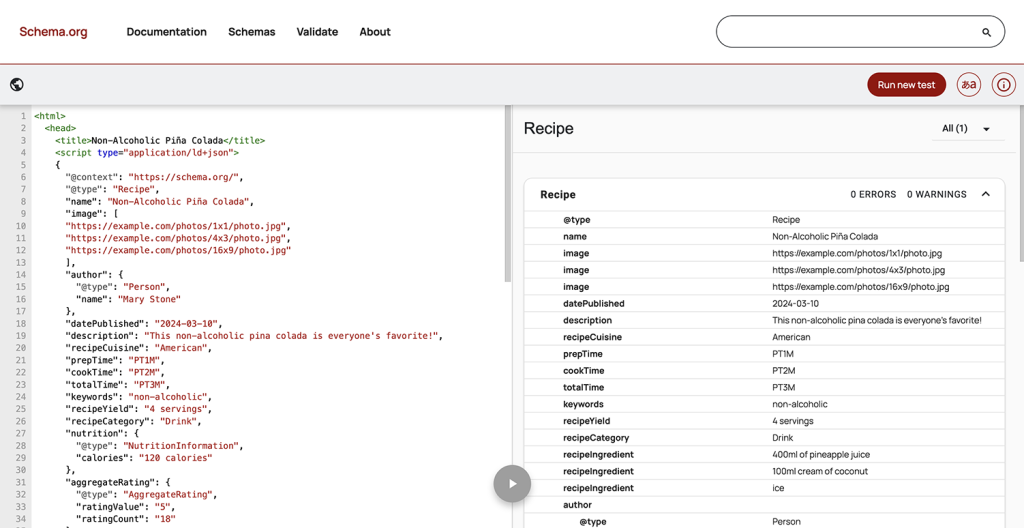
Use Google’s Rich Results Test to check any URL. Paste in your page address, and Google will show:

  • What schema types were detected
  • Whether you’re eligible for rich results
  • Any errors preventing rich results from displaying
  • A preview of how your rich result might appear

Critical errors must be fixed immediately; they prevent Google from understanding your structured data entirely. Warnings are less urgent but should be addressed when possible.

Also monitor Google Search Console under Enhancements and check for Rich Results coverage. This shows which pages on your site have valid schema, which have errors, and what rich result types you’re eligible for.

Common schema mistakes to avoid

Marking up content that isn’t visible on the page

Schema must match your visible content exactly. If your page doesn’t display a price, you can’t add price schema just to get rich results. Google calls this “spammy structured data” and may penalise your site.

Using the wrong schema type

A blog post isn’t a Product. A service page isn’t an Article. Use the schema type that actually matches your content. When in doubt, check Schema.org’s documentation for the correct type.

Not updating schema when content changes

If your business hours change, your prices update, or an event gets rescheduled, update your schema immediately. Outdated structured data frustrates users and erodes trust.

Forgetting to test after WordPress updates

Plugin updates, theme changes, or WordPress core updates can sometimes break schema implementation. Test your schema periodically, particularly after major updates, to ensure it still validates correctly.

Does schema markup improve rankings?

Schema doesn’t improve page rankings directly. Google’s John Mueller has confirmed repeatedly that schema is not a ranking factor. But the indirect benefits are significant:

  • Higher CTR from rich results leads to more traffic
  • Better content understanding improves relevance matching
  • Enhanced brand authority through knowledge panels

Think of schema as making your content more accessible and attractive, not as a ranking boost. Sites with schema don’t automatically outrank those without, but they often perform better because users prefer clicking on richer, more informative listings.

Schema Markup for GEO and AI Visibility

As of May 2026, the internet is flooded with contrasting statements on whether schema markup directly affects generative engine optimisation (GEO) performance.

Google’s own guide to optimising your website for generative AI clearly states that while “structured data isn’t required for generative AI search… it’s still a good idea to continue using it as part of your overall SEO strategy”.

Additionally, a 2025 study from Search/Atlas found that there was no discernible link between schema markup coverage and AI citation rates.

However, some SEO agencies are still adamant that schema markup can improve your website’s visibility in search results.

This is because AI systems such as ChatGPT, Gemini, Claude and Grok prioritise clean and well-structured data when generating answers to user questions, and while schema might not directly influence AI responses now, there’s no reason to assume that well-structured data won’t become a relevant factor in the future.

Schema is table stakes in 2026

Schema markup has moved from optional enhancement to baseline requirement. Sites without schema are at a measurable disadvantage, not in rankings, but in visibility and click-through rate.

The good news is that implementing schema on WordPress is straightforward. Install Rank Math or Yoast, configure your basic details, and the plugin handles most of the work automatically. Test your implementation, fix any errors, and update your schema when your content changes. That’s the baseline.

For businesses serious about search visibility, schema isn’t something to revisit later; it should be part of your site from day one. Done properly, it’s one of the highest-leverage, lowest-effort improvements you can make to how your content appears in search.

Need help with schema implementation?

We build schema markup into every WordPress site we develop, configured specifically for your content types and business model. Whether you’re starting fresh or need to add structured data to an existing site, we can help.

Share this article

Ready to push your platform?

Ready to push your platform?

Ready to push your platform?

Ready to push your platform?

Ready to push your platform?

Ready to push your platform?

Ready to push your platform?

Ready to push your platform?

Ready to push your platform?

Ready to push your platform?

Ready to push your platform?

Ready to push your platform?

Ready to push your platform?

Ready to push your platform?

Ready to push your platform?

Ready to push your platform?

Ready to push your platform?

Ready to push your platform?

Ready to push your platform?

Ready to push your platform?

Ready to push your platform?

Ready to push your platform?

Ready to push your platform?

Ready to push your platform?

Ready to push your platform?

Ready to push your platform?

Ready to push your platform?

Ready to push your platform?

Ready to push your platform?

Ready to push your platform?

Ready to push your platform?

Ready to push your platform?