
Got a project in mind?
We’d love to hear about it.

Get in touch
Yellow Peach web design agency

Core Web Vitals Explained for Business Owners

Ben Peake
written by Ben P

Guides

This guide explains what Core Web Vitals are, why they matter for your business, and what you can actually do about them.
Core Web Vitals might sound technical, but they measure something very simple; how your website actually feels to the people using it. Do pages load quickly? Does your site respond immediately when someone clicks a button? Do elements stay where they’re supposed to, or do they jump around and cause frustrating misclicks

Google introduced Core Web Vitals in 2020 and made them official ranking factors in 2021. By 2026, they’re firmly embedded in how search engines evaluate page quality. Sites with poor Core Web Vitals scores struggle to rank competitively, even with strong content, because Google knows that slow, unresponsive, visually unstable sites frustrate users.

This guide explains what Core Web Vitals are, why they matter for your business, and what you can actually do about them.

What are core web vitals

What are Core Web Vitals?

Core Web Vitals are three specific metrics Google uses to measure real user experience. They’re not based on simulated tests in a lab, they’re based on data from million

s of actual visitors using Chrome browsers to navigate the web. Google measures these metrics at the 75th percentile, which means that 75% of your visitors need to have a good experience for your site to “pass” the assessment.

Largest Contentful Paint (LCP)

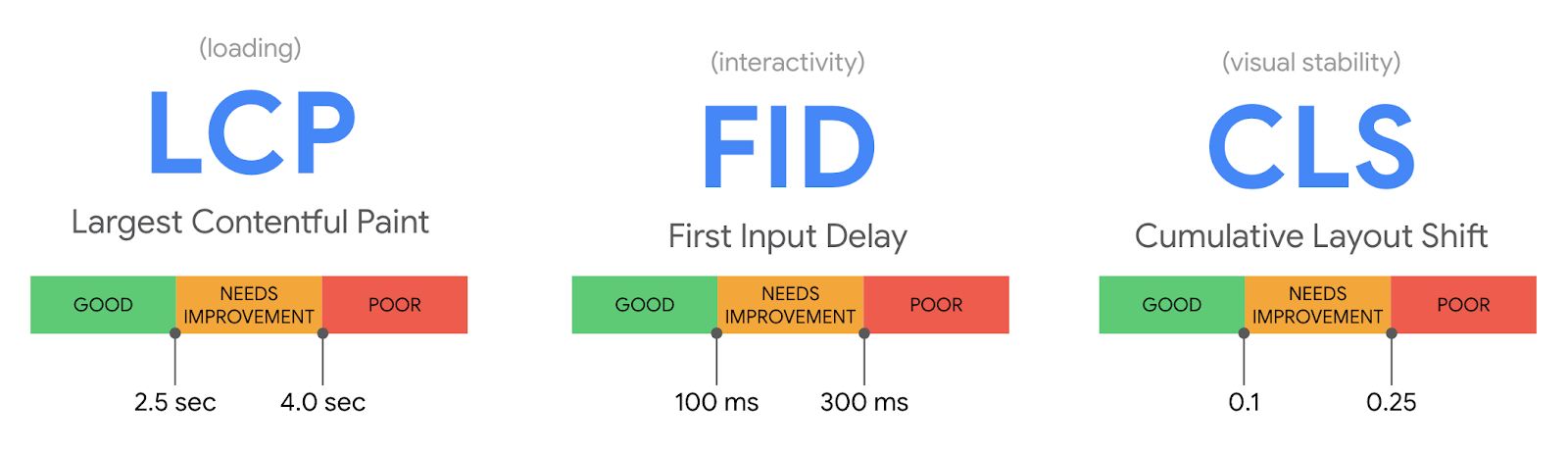
LCP measures loading speed, specifically, how long it takes for the main content on your page to become visible. This is usually your hero image, main heading, or the largest block of text above the fold.

The ideal target for Largest Contentful Paint is 2.5 seconds or less. If your LCP is over 4 seconds, Google considers it “poor”.

Why Lower Contentful Paint matters

If your main content takes too long to appear, users assume your site is broken or slow and leave. Research shows that 53% of mobile users abandon sites that take longer than 3 seconds to load.

Interaction to Next Paint (INP)

INP measures responsiveness – how quickly your site reacts when someone clicks a button, opens a menu, or types in a form. It replaced First Input Delay (FID) as the official metric in March 2024 because it provides a more complete picture of how responsive your site feels throughout a user’s entire visit.

The ideal target for Interaction to Next Paint is 200 milliseconds or less. If your INP is over 500ms, it’s considered poor.

Why Interaction to Next Paint matters

When users click something and nothing happens immediately, they lose confidence that the site is working. Sluggish interactions make sites feel broken, even if they eventually respond.

Cumulative Layout Shift (CLS)

CLS measures visual stability – how much your page content unexpectedly shifts around while it’s loading. This happens when images, ads, or embedded content load late and push other elements out of the way.

The ideal target for Cumulative Layout Shift is 0.1 or less. A score above 0.25 is poor.

Why Cumulative Layout Shift matters

Layout shifts are frustrating. You go to click a button, but just as your finger touches the screen, an ad loads and pushes the button down. You accidentally tap the wrong thing. CLS quantifies how often that happens.

If you’re seeing poor Core Web Vitals scores and aren’t sure where to start, our WordPress development team builds sites with performance optimised from day one. We handle the technical work so your site loads fast, responds instantly, and stays visually stable.

Why Core Web Vitals matter for your business

Core Web Vitals aren’t just a technical checkbox. They directly affect three things that matter to your bottom line: search rankings, user behaviour, and conversion rates.

They’re confirmed Google ranking factors

Core Web Vitals are part of Google’s page experience signals, which contribute to how pages are ranked in search results. Industry research suggests they account for approximately 10-15% of ranking weight in competitive queries. That might not sound like much, but when you’re competing against similar content, Core Web Vitals can be the tiebreaker that determines who ranks on page one.

Poor performance drives users away

Slow sites lose visitors before they even engage with your content. Research consistently shows that:

If your Core Web Vitals are poor, you’re haemorrhaging potential customers who never even saw what you had to offer.

Better performance improves conversions

The flip side is equally true – fixing Core Web Vitals measurably improves business metrics.

Real-world case studies show:

These aren’t marginal gains. Core Web Vitals optimisation delivers real, measurable ROI.

PageSpeed insights tool

How to check your Core Web Vitals scores

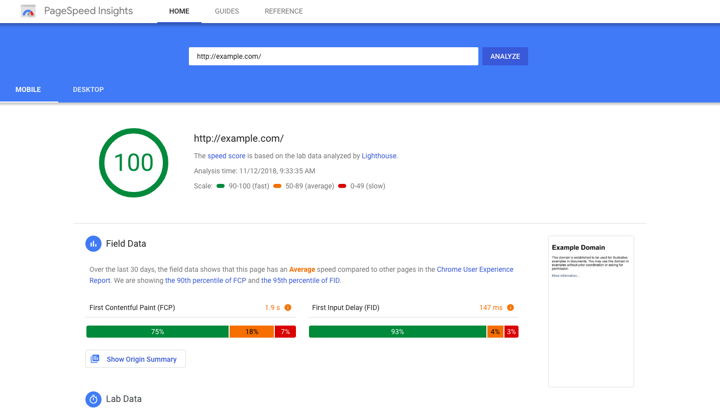
The easiest way to check your Core Web Vitals is Google PageSpeed Insights. Just paste in your URL and Google will show you:

  • Your LCP, INP, and CLS scores
  • Whether you’re passing or failing each metric
  • Specific recommendations for what to fix

PageSpeed Insights shows two types of data: “Lab Data” (simulated tests on a fast connection) and “Field Data” (real user data from Chrome browsers). The field data is what actually matters for rankings, as it reflects how real visitors experience your site. If you don’t have enough field data yet, focus on the lab scores as a proxy.

For more detailed ongoing monitoring, set up Google Search Console. The Core Web Vitals report there shows which pages on your site are passing, which need improvement, and which are failing, based on real user data over the past 28 days.

What causes poor Core Web Vitals (and how to fix them)

Understanding the metrics is useful. Knowing what actually causes poor scores is more useful. Here are the most common issues and what to do about them.

Common causes of poor Largest Contentful Paint

  • Unoptimised images: Your hero image is 5MB when it should be under 200KB.
  • Slow server response time: Your hosting takes too long to generate and send the page.
  • Render-blocking resources: JavaScript and CSS files delay the page from displaying.
  • No CDN: Visitors far from your server wait longer for content to arrive.

How to fix Largest Contentful Paint

  • Optimise images properly – compress them, convert to WebP format, and resize to appropriate dimensions before uploading.
  • Use quality managed WordPress hosting rather than cheap shared hosting.
  • Defer non-critical JavaScript so it doesn’t block page rendering.
  • Consider a CDN to serve content faster to users globally.

Common causes of poor Interaction to Next Paint

  • Heavy JavaScript execution: Scripts take too long to process interactions
  • Too many third-party scripts: Chat widgets, analytics, ads all compete for processing time
  • Unoptimised event handlers: Code runs inefficiently when users click buttons or interact with forms

How to fix Interaction to Next Paint

  • Reduce and optimise JavaScript. Remove unnecessary plugins and scripts.
  • Defer third-party tools that aren’t critical.
  • Use efficient, well-coded themes and avoid page builders that generate bloated markup. This often requires developer expertise to implement properly.

Common causes of poor Cumulative Layout Shift

  • Images without dimensions: The browser doesn’t know how much space to reserve, so content jumps when images load
  • Ads and embeds: Third-party content loads late and pushes everything else down
  • Web fonts loading: Text displays in one font, then shifts when your custom font loads
  • Dynamic content injection: Elements added to the page after initial render cause shifts

How to fix Cumulative Layout Shift

Set explicit width and height attributes on all images and videos so the browser reserves the correct space. Use font-display: swap or font-display: optional to control how web fonts load. Reserve space for ads and embeds so they don’t push content around when they appear. Avoid inserting content above existing content unless it’s in response to a user action.

Core Web Vitals issues often stem from how a site is built rather than how it’s managed. If your scores are poor and the recommended fixes feel overwhelming, it’s often more cost-effective to address them during a rebuild or redesign. Our WordPress development team builds performance into every site from the ground up, so Core Web Vitals are excellent by default rather than something you fix retroactively.

WordPress-specific advice

WordPress sites can achieve excellent Core Web Vitals scores, but they can also perform terribly if configured poorly. Here’s what matters most.

Choose quality hosting

Cheap shared hosting struggles with Core Web Vitals because server response times are slow and resources are limited. Managed WordPress hosting (providers like Kinsta, WP Engine, or Cloudways) is purpose-built for performance and handles caching, CDN, and server optimisation automatically. The difference in LCP alone often justifies the cost.

Be selective with plugins

Every plugin you install adds code to your site. Some are efficient; many aren’t. Audit your plugins regularly and remove anything you’re not actively using. Avoid plugins that inject heavy scripts (sliders, animation libraries, social feeds) unless they’re genuinely essential to your business.

Use performance plugins correctly

Plugins like WP Rocket, LiteSpeed Cache, or Perfmatters can significantly improve Core Web Vitals by handling caching, lazy loading, JavaScript optimisation, and more. But they need to be configured correctly, as misconfigured caching plugins can actually make things worse. If you’re not confident in the settings, work with someone who understands them.

Use image compression plugins

Optimise images at upload

Don’t rely on WordPress to resize or compress images for you. Use plugins like ShortPixel or Imagify to automatically compress and convert images to WebP on upload. Better still, optimise images before uploading them using tools like Squoosh or TinyPNG.

For more information, see our guide on how to optimise images without losing quality.

Common misconceptions about Core Web Vitals

“My site looks fast to me, so my scores must be fine”

What feels fast on your device over your office Wi-Fi might be painfully slow for a mobile user on a 4G connection. Core Web Vitals are measured using real data from actual visitors across all devices and connection speeds, not just your personal experience.

“I passed PageSpeed Insights once, so I’m done”

Core Web Vitals change as your site changes. Add a new plugin, upload an unoptimised image, or integrate a third-party tool, and your scores can degrade. Performance is ongoing maintenance, not a one-time fix.

“Fixing Core Web Vitals will guarantee higher rankings”

Core Web Vitals are one ranking factor among many. Excellent performance won’t overcome weak content, poor keyword targeting, or a lack of backlinks. But when you’re competing against similar pages with comparable content quality, better Core Web Vitals give you an edge.

“Only developers can fix Core Web Vitals”

Some fixes do require technical expertise, but many don’t. Optimising images, removing unnecessary plugins, and upgrading hosting are all things non-developers can do. The key is knowing what to prioritise and when to bring in someone with deeper expertise.

Final thoughts: Performance is a competitive advantage

Core Web Vitals quantify something that’s always mattered: does your website feel fast, responsive, and stable? Google introduced these metrics because slow, janky websites frustrated users, and frustrated users bounced back to search results and clicked on competitors instead.

By 2026, Core Web Vitals are table stakes. Sites that don’t meet the thresholds are at a measurable disadvantage in competitive search results. But the benefits go far beyond rankings. Better Core Web Vitals mean lower bounce rates, higher engagement, and more conversions.

If your scores are poor, don’t panic. Most issues are fixable, and the ROI from fixing them is clear. Start with the basics: optimise images, upgrade hosting if you’re on cheap shared servers, remove unnecessary plugins, and test your site regularly. For more complex issues, work with someone who understands performance optimisation. The investment pays back quickly.

Need help improving your Core Web Vitals?

We build WordPress sites that perform excellently on Core Web Vitals from day one. If your current site is struggling with poor scores, or if you’re planning a rebuild and want to get performance right from the start, we can help.

Share this article

Ready to push your platform?

Ready to push your platform?

Ready to push your platform?

Ready to push your platform?

Ready to push your platform?

Ready to push your platform?

Ready to push your platform?

Ready to push your platform?

Ready to push your platform?

Ready to push your platform?

Ready to push your platform?

Ready to push your platform?

Ready to push your platform?

Ready to push your platform?

Ready to push your platform?

Ready to push your platform?

Ready to push your platform?

Ready to push your platform?

Ready to push your platform?

Ready to push your platform?

Ready to push your platform?

Ready to push your platform?

Ready to push your platform?

Ready to push your platform?

Ready to push your platform?

Ready to push your platform?

Ready to push your platform?

Ready to push your platform?

Ready to push your platform?

Ready to push your platform?

Ready to push your platform?

Ready to push your platform?